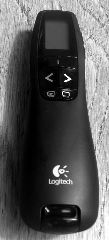
 I recently acquired a Logitech Presenter R800. It’s a beautiful device - not particularly cheap, but very slick and easy-to-use. Unfortunately, Windows XP (Service Pack 3) on my system refused to recognise it - the device was listed as USB Receiver in Windows Device Manager, but Windows kept claiming it couldn’t find the driver. It is presented to the system as a standard USB HID device, so there is no Logitech-specific driver: it uses the standard Windows HID Driver. It worked perfectly out of the box on Ubuntu 9.10.
Logitech Presenter R800 with USB HID in Windows XP SP3
Dialling Problems with Vodafone 3G on Windows
As I’ve written about before, I use a combination of Vodafone 3G and the AT&T Network Client on Windows to access my corporate VPN. Recently, I’ve been seeing this error a lot when ‘dialling’ the 3G network (I connect it via the Windows dialler, rather than the Vodafone client):

This morning, I figured out what it was that was causing the problem. AT&T was open when I was dialling, and had the modem selected in the ‘Cellular’ tab (which I don’t normally use):
More ...Avoid Vodafone Mobile Connect client in Windows
If you’re anything like me, you _hate _the Vodafone Mobile Connect client - it’s buggy, unstable, and requires frequent reboots/restarts/taking-the-card-out-and-putting-it-back-in-again to make it work. What I only discovered today - although I should have known from ancient dial-up modem connections years ago - was that you can just use the regular ‘Network Connections’ facility of Windows. Just locate the ‘Vodafone Mobile Connect’ entry, right-click and select ‘Connect’ (I think this will only appear once you’ve installed the Vodafone software):
More ...Reinstalling The Thinkpad
My work Thinkpad (a T61) was becoming a little crufty, so I decided to reinstall it from scratch. Here are a few lessons I learnt along the way:
-
Making a hot copy of your entire drive onto a USB hard disk with VMWare Converter beforehand is a great idea. This basically means you have your entire previous installation still bootable, so you can rescue any data or settings you forgot about, after you’ve done the reformat and reinstall. VMWare Converter is free.
More ...
Fullscreen Video Flicker on T61 Thinkpad
Until recently, I was having problems with fullscreen video in Windows on my new T61 Thinkpad, which uses an NVidia Quadro NVS 140M display adapter. Video would regularly flicker when fullscreen was enabled in a variety of players, including Windows Media Player and various embedded Flash players, and had to be taken out of fullscreen and put back - sometimes as many as 10 times - before the image was stable.
More ...Firefox 3 RC1
Normally I don’t touch pre-release software these days (apart from the IBM software I work with, of course). But I just downloaded and installed Firefox 3 RC1. And boy, Mozilla weren’t kidding - it’s noticeably faster and snappier than Firefox 2. Very impressive. For someone like me who spends a lot of time in a browser, this is just great.